


 GestiTec Admin
 GestiTec Operaciones
 GestiTec Personal
 GestiTec Negocio
GestiTec Admin · the office
Technician scheduling and work supervision
Plan the week in one place and see what’s overdue, the breakdowns and what’s still unscheduled, without calling anyone.
Included in GestiTec Core, from €19.90 a month + VAT with 3 users. See prices
The supervisor’s Home screen, at a glance
When you log in, you see what needs attention today, and you open each job from there.
- done, still to do and those with no technician
- Today's visits
- visits from earlier days still open
- Overdue
- open, serious and not assigned to anyone
- Faults
- units with no visit in the calendar
- Not scheduled
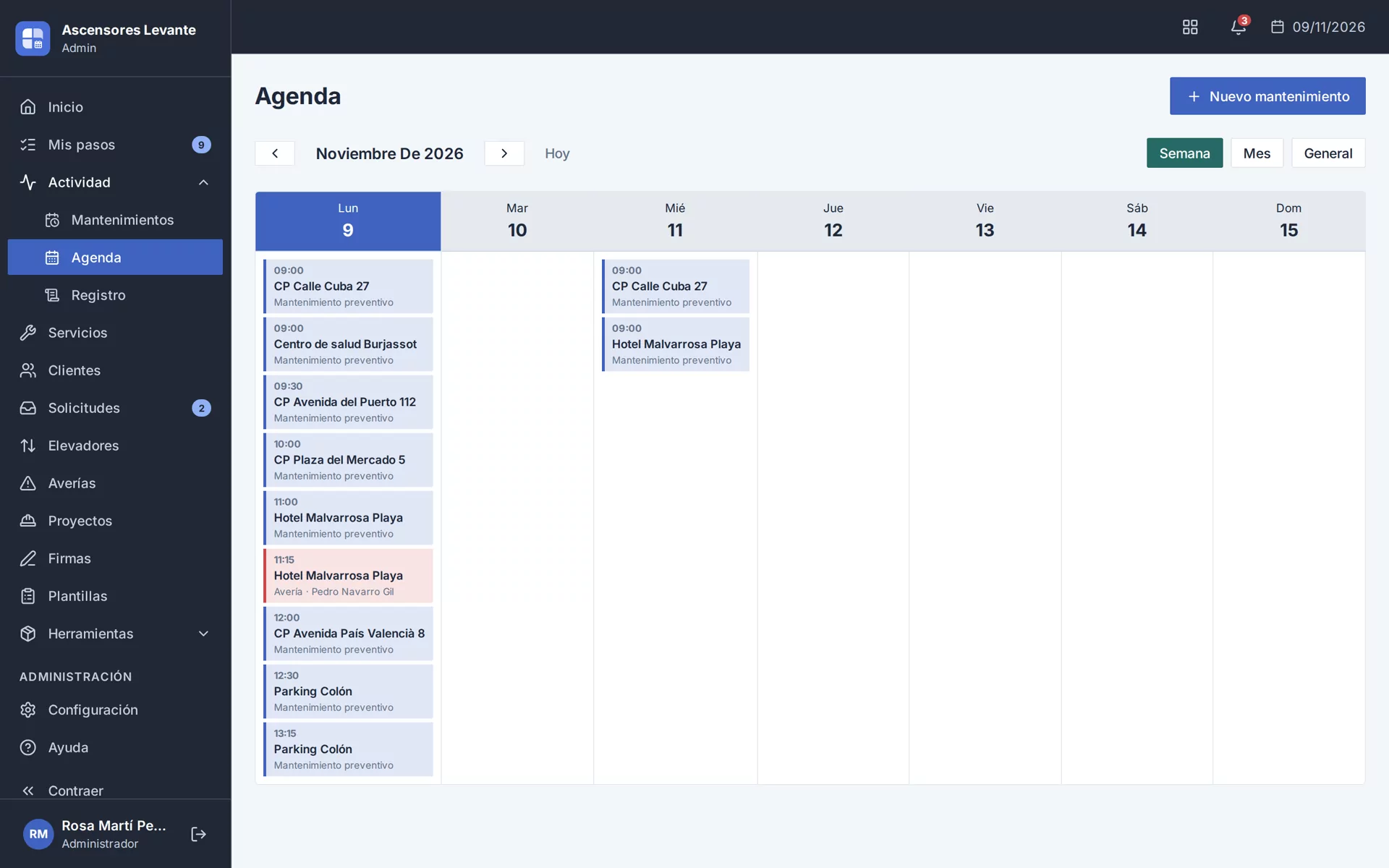
The team’s week, in a single calendar
By week, month or overview, with who’s doing each visit. When you schedule one, the technician, date and checklist fill themselves in.
- It suggests the technician from the last visit and the due date; you decide
- Move and reassign, depending on each person’s permissions
- Breakdowns, in the same calendar
Everyone sees what’s theirs
With your own roles, permissions and visibility by team, each person logs in with their own user and sees their own work.

The office
Schedules, moves, reassigns and supervises all the work.

The team leader
Organises and follows their team’s work.

The technician
Sees their calendar and jobs in GestiTec Operaciones.
What was done, archived and logged
Signed job reports in their archive, and a log of who changed what and when. Anything deleted can be restored for 30 days.
- Find a job report by customer, unit or technician
- Resend it by email, also to another address
Try it here: assign a breakdown
With sample data. Choose the breakdown, the technician and the time, and see how it reaches their phone.
- Pick the breakdown
- Pick a technician
- Give it a time
The breakdown is already on the technician’s phone. No calls, no messages.
The office
Calendar
WeekMonthAll assigned
Mon9
Tue10
Wed11
Thu12
Fri13
Pedro Navarro’s phone
Maintenance
Today
The breakdown is already on the technician’s phone. No calls, no messages.
Questions about scheduling
See all questionsNo. When you schedule a visit and choose the unit, it fills in the technician from its last visit, the date it’s due and the checklist for its type, and you can change any of the three. You assign breakdowns yourself.
From the calendar you change the technician on their visits, and they move to a colleague’s app. Anyone with that permission can do it.
Anyone with that permission. There are fourteen, grouped into visits, management and administration, and you can create your own roles with the ones you need.
Not necessarily. Without the permission to see everyone’s visits, a technician only sees their own calendar, and with visibility by team a team leader sees their team’s work. We set it up with you at the start.
It goes to the bin, where it stays for 30 days and can be restored in full: breakdowns, visits, customers, units, job reports, projects or contracts.
No. GestiTec Admin opens in the browser, with the same username and password as the technician’s app.
Shall we plan your week together?
We’ll show you, with a sample company, how you’d share out your team’s work and what you’d see every morning. Included in GestiTec Core, from €19.90 a month + VAT with 3 users.
- No obligation
- You deal with the team that builds it
- Quick reply